
Surveys
Multi-step questionnaires. Use surveys when you need structured, comparable data — onboarding, churn reasons, pricing sensitivity, post-purchase CSAT.
- 1 · BuildContent & questions
- 2 · DesignTheme & layout
- 3 · TargetAudience · trigger · schedule · caps
- 4 · AnalyzePerformance & responses
Stage 1 — Build
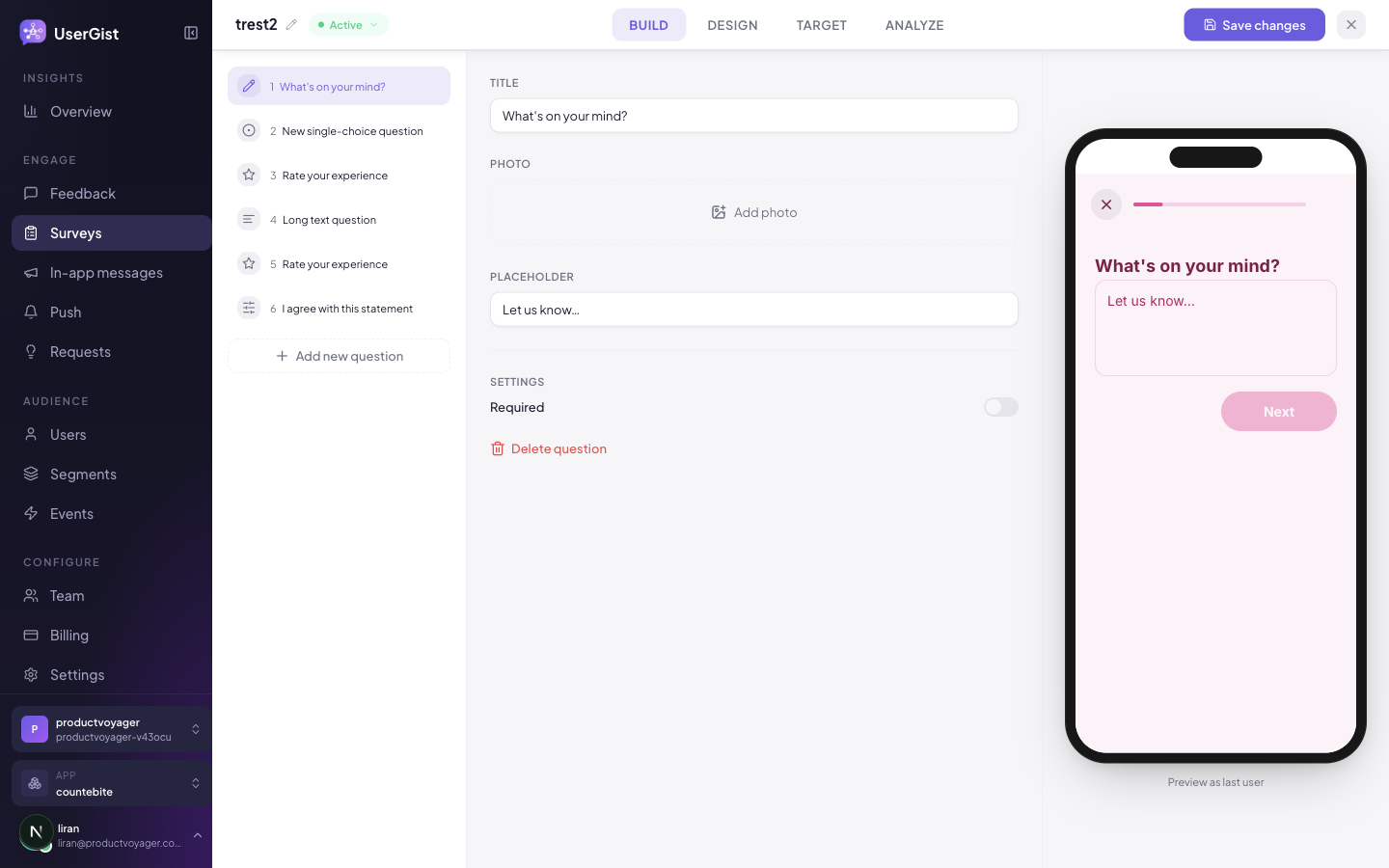
The Build stage is a question rail (left) + per-question settings + a live phone preview. Drag a question type into the flow, edit it, re-order.
Question types (8 in the dashboard palette)
The composer palette exposes 8 types:
| Type | Returns | Notes |
|---|---|---|
info_screen | nothing | Title, optional subtitle, Body textarea. Use as intro / outro. |
single_choice | one option ID | Add options 1-by-1. |
multi_choice | array of option IDs | Same option editor as single-choice. |
short_text | string | No extra editor fields today; the SDK renders a single-line input. |
long_text | string | No extra editor fields today; the SDK renders a multi-line textarea. |
rating | 1–5 or 1–10 | Scale picker (5 or 10). |
nps | 0–10 | No extra editor fields. |
likert | 1–5 | No extra editor fields; SDK renders a 5-point statement grid. |
The Zod schema and SDK renderer also support ranking (drag-to-reorder) and single_date (calendar picker). They aren't in the composer palette today — author them via the API if you need them.
Per-question settings
Every question has the same three core fields, plus type-specific extras:
- Title — the question your user reads.
- Subtitle (optional) — secondary line beneath the title.
- Required — checkbox. Blocks continue until answered.
Beyond that, the editor is intentionally minimal — schema-level fields like short_text validation modes (email/url/number/regex), nps/rating low/high labels, multi_choice min/max selections, and likert custom labels exist in the API but aren't yet in the composer. Reach the editor mock-room if you need any of these surfaced.
End screen
Surveys always end on an end screen. The editor exposes a headline (required, defaults to "Thanks!"). The schema additionally accepts a body, CTA, and follow-up CTA — those are API-only today.
Branching
The data model supports per-question branch rules (flow.branches) but the question editor doesn't yet expose a branching UI. Build branched surveys by POST-ing the survey JSON with the branches array — schema in apps/api/src/schemas/surveys.ts.
Stage 2 — Design
Same shape as the Build stage minus the editor — three panes: question rail · theme gallery + custom tokens · phone preview reflecting the selected question.
The theme tokens are identical to Feedback: primary, background, text, subtext, border, accent, button, borderRadius, fontFamily. Themes are shared across prompts, surveys, and in-app messages.
Stage 3 — Target
The flow is Audience → Platforms → Trigger. Platform choices come from the app's settings: React Native, Expo and Flutter offer iOS and Android, and Web is shown only when enabled. Select both native options to reach both app versions. See platform targeting.
Audience
Same builder as every other channel — see Segments for the 8 condition kinds and their operators. Combine with All / Any matching, preview the audience size live.
Trigger
Surveys use the shared composer trigger builder with 3 kinds:
| Kind | Dashboard label | Hint |
|---|---|---|
app_open | On app open | "Fire when the user opens the app." |
event | When a user performs an event | "Fire when the SDK records a specific event (with optional property filters)." |
app_version_changed | When the user updates the app | "Fires on the first cold-start after the app version changes — perfect for "What's new"." |
The event kind exposes the same sub-controls as feedback:
- Event name — autocomplete from registered events.
- Property filters — narrow which events count (
property + op + value). - Trigger occurrence — Every time · First occurrence · After Nth occurrence (with a numeric N).
First occurrence permits only the first qualifying event per campaign and user; After Nth occurrence permits exactly the Nth. Counters persist across app reloads with Once only off. Earlier events before activation or under Every time are not backfilled; counted history remains after rule edits, pauses, and reactivation. See occurrence counting details.
All three kinds share:
- Delay — in minutes.
- Once only — checkbox.
- Active window — date-range toggle with Start / End.
The schema defines four delivery modes (triggered, scheduled, on_demand, link_only). The composer currently hard-codes mode: 'triggered' — scheduled, on-demand and shareable-link delivery aren't yet exposed in the UI. They will be; until then, hit the API directly.
Frequency caps
The editor exposes 3 knobs:
| UI label | Field | Range | What it does |
|---|---|---|---|
| Cooldown between attempts (seconds) | cooldownSeconds | 0+ | Minimum gap between two attempts on this survey for the same user. |
| Per-survey cooldown (days) | perCampaignDays | 0–365 | Don't show this survey to the same user within N days. |
| Global per-user cooldown (days) | perPillarDays | 0–365 | Don't show any survey to this user within N days. |
The schema also accepts perGlobalDays and maxPerUser — those are API-only today.
A 5+ question survey is a big ask. perPillarDays = 60 is a strong default — no other survey for two months — and pair with event triggers so the timing is contextual.
Stage 4 — Analyze
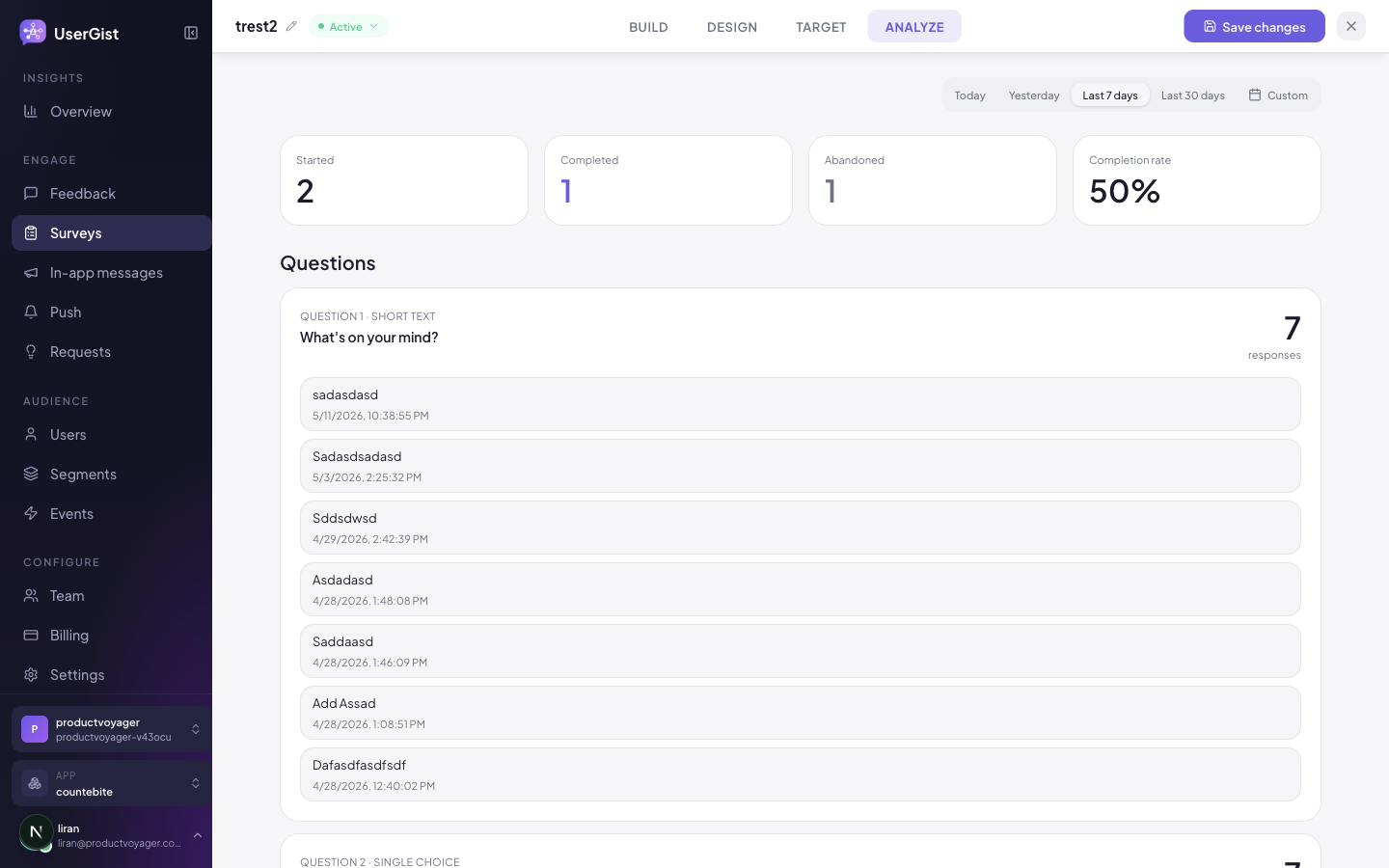
After publish, the editor flips to a read-only Analyze view with:
- Funnel — Impressions → Started → Q1 answered → … → Completed.
- Per-question drop-off — which question loses the most respondents.
- Time-to-complete distribution.
- Per-question distribution — bars / histograms / counts depending on type.
- Raw responses export — CSV / JSON.
Status lifecycle
| Status | Meaning |
|---|---|
draft | Editor accepts changes; SDKs don't see it. |
active | Live and triggered. |
paused | Live but temporarily not delivered. |
completed | Final state for surveys that finished their run (scheduled / one-off API senders). |
archived | Not delivered; retained until an operator permanently deletes it. |
Save-resume
The SDK persists partial answers in encrypted on-device storage. If a user backgrounds your app mid-survey, the next open resumes at the unanswered question. Cleared on submit, on dismiss, and on UserGist.reset().
SDK side
const surveys = await UserGist.getAvailableSurveys()
const onboarding = surveys.find((s) => s.tag === 'onboarding')
if (onboarding) UserGist.openSurvey(onboarding.id, { language: 'en' })

// Deep-link surveys (API-only mode today)
UserGist.handleSurveyDeepLink(url)

// React to responses
UserGist.onResponse((info) => { /* … */ })
API
GET /v1/apps/:appId/surveys— listPOST /v1/apps/:appId/surveys— createPATCH /v1/apps/:appId/surveys/:surveyId— updateDELETE /v1/apps/:appId/surveys/:surveyId— permanently deleteGET /v1/apps/:appId/surveys/:surveyId/analytics— analytics rollupGET /v1/apps/:appId/surveys/:surveyId/responses— paginated raw responses
Canonical schemas: apps/api/src/schemas/surveys.ts.
Personalized questions and delivery
Use Insert field in supported survey content for saved user fields, latest activity or the triggering event. Each attempt keeps its resolved question snapshot, so a later watch event does not change a survey already in progress. See Personalize messages for source selection, fallbacks and Preview as user.
With the immediate-delivery API and SDK release, triggered surveys can include their authorized attempt in the delivery response. React Native also supports local starts for eligible cached, repeatable, uncapped, non-personalized surveys. These use a ten-minute signed permission and durable progress saving; new personalized surveys still need an online decision. See survey delivery and recovery for persistence, consent and offline limits.
What's next
Surveys on websites
The Web SDK supports opening surveys, listing available surveys, survey links, and save/resume. Activate a user and grant survey consent; tracked-event delivery also needs analytics consent. Select Web in Target and configure the browser dialog or side panel under Design → Web presentation, below themes. Narrow browsers use a full-height survey layout. Preview with Web desktop or Web mobile; only desktop offers enlargement.