
Users
A directory of every anonymous installation and identified user, with properties, device tokens, and a full event timeline.
What you get
- Search by anonymous installation ID or identified external ID.
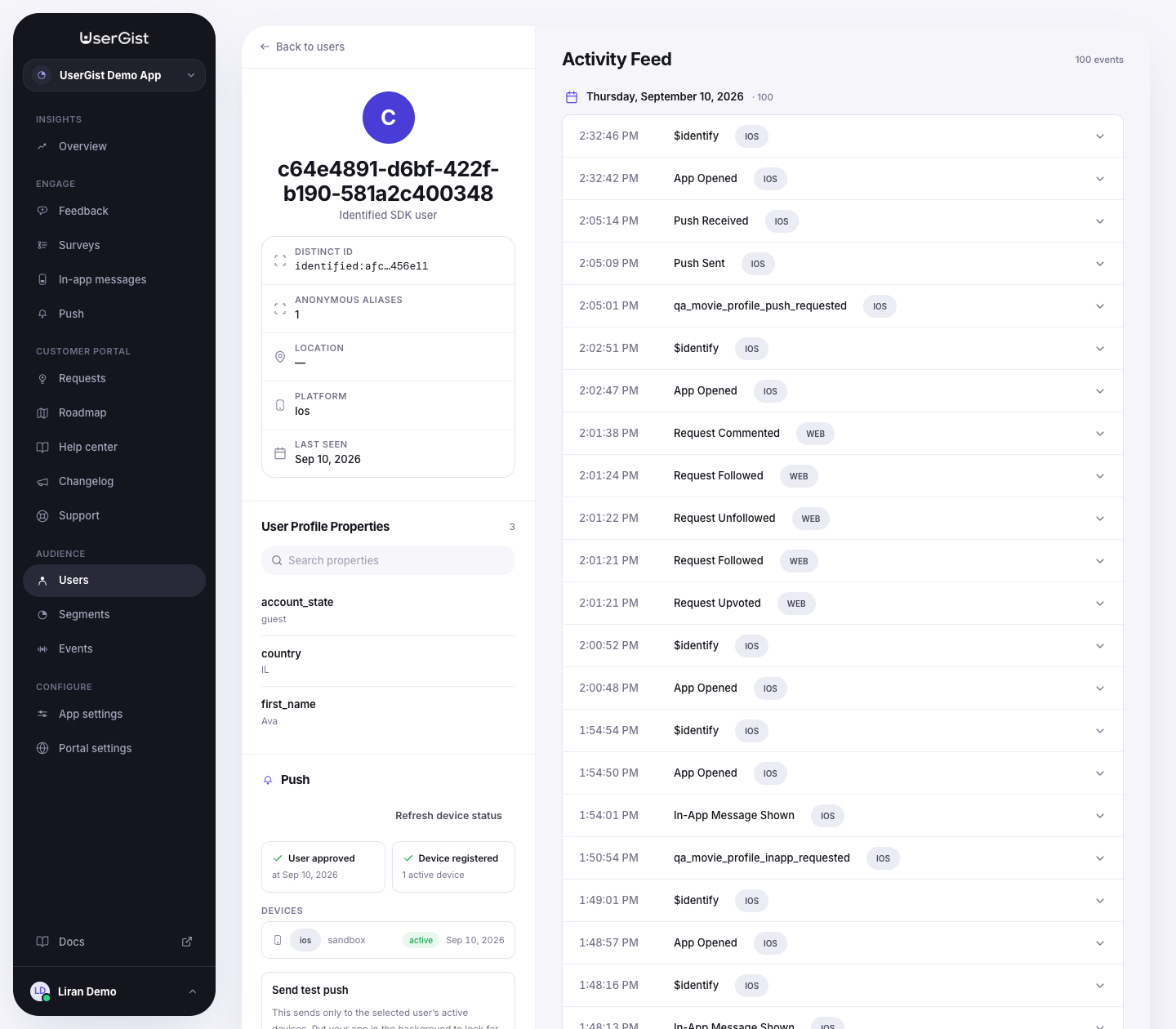
- Per-user profile — properties, devices (with last-seen), event timeline, response history.
- Manual lookup of survey, request, and push delivery state.
- GDPR delete — wipes a user's events, identities, and devices on request.
- Export to CSV or JSON.
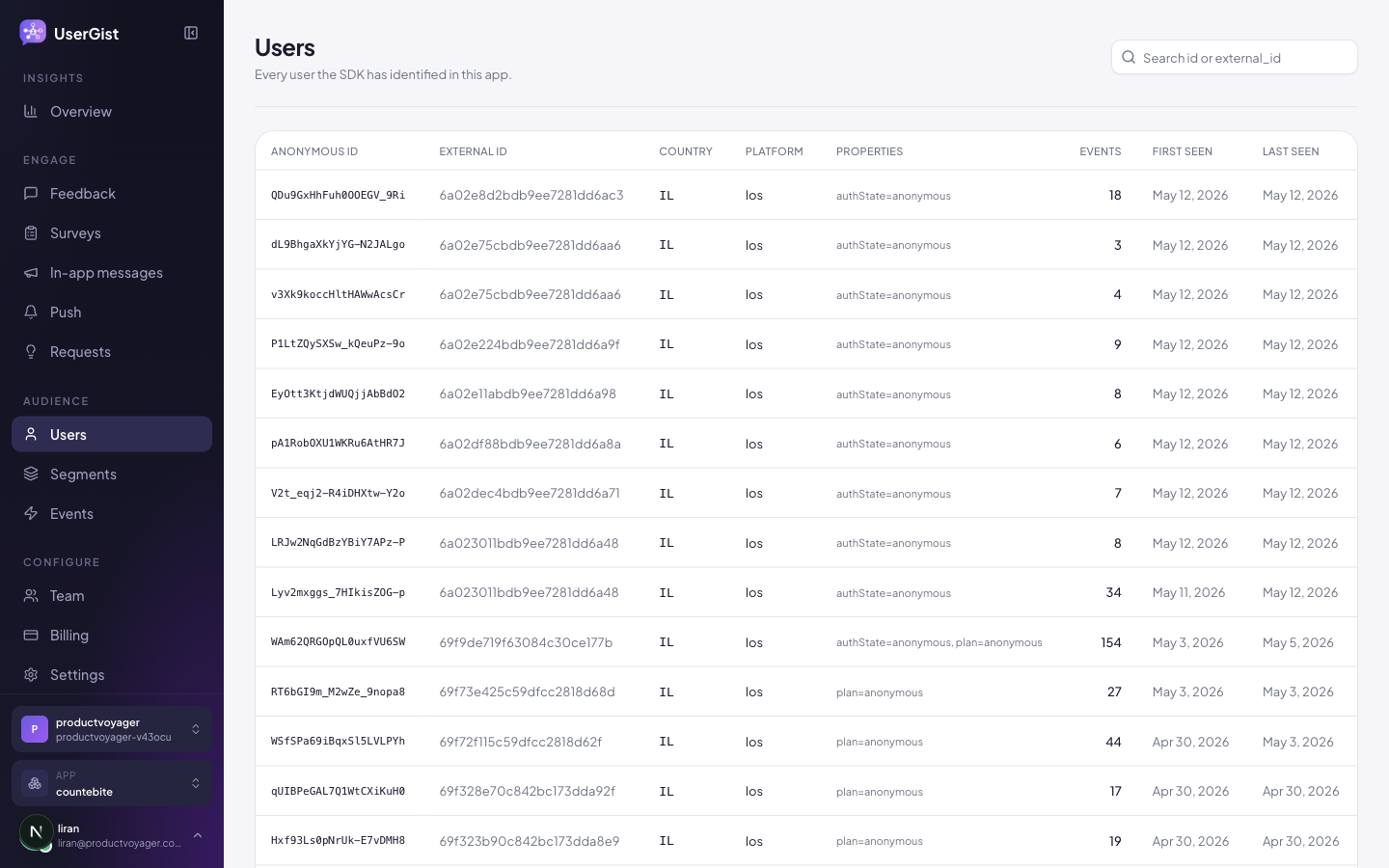
Anonymous vs identified
A user is anonymous until your SDK securely calls identify(userId, props, subjectToken). Anonymous users appear in this directory with a profile keyed by anonymous_id; identified users also show their stable external ID. When an installation is identified, its earlier anonymous activity remains connected to the same user history.
Portal participants
Customer Portal participation creates a separate app-scoped identity with a portal origin. Email verification authenticates the visitor for portal submission, voting, and private support; it does not automatically link them to an anonymous or identified SDK user with the same email. Keep SDK and portal origins distinct when interpreting user activity.
Public portal request pages do not expose the submitter's private identity or SDK comments. Your team can see request source and the verified visitor email in the dashboard. See Customer Portal concepts and visitor authentication.
Properties
You can attach profile properties during secure identify:
const { subjectToken } = await yourBackend.getUserGistSubjectToken()
await UserGist.identify('user_42', {
  email: '[email protected]',
  plan: 'pro',
  signedUpAt: '2026-01-12T00:00:00Z',
  country: 'DE',
  betaTester: true,
}, subjectToken)
To update a profile without identifying or re-identifying, use React Native or
web setUserProperties. This works for the current anonymous user too:
await UserGist.setUserProperties({ first_name: 'Ava', country: 'IL' })
await UserGist.setUserProperties({}, ['first_name'])
Updates require analytics consent and accept flat string, number, boolean or null values. They can supply personalized messages and typed navigation data. A backend can atomically update related current-state fields through the property update API.
Properties are namespaced under user.<key> for segment matchers ({ property: "user.plan", op: "eq", value: "pro" }). The personalization picker uses the saved key itself, such as plan.
By default, sensitive contact and identity properties are removed before storage unless their exact property keys are in the per-app allow-list at App settings → Privacy. See Admin → Privacy & PII.
Devices
Every device that's ever opened your app is recorded. The profile shows:
- Platform (iOS / Android / RN / Flutter).
- Push tokens (with last-seen).
- OS version + app version.
- Anonymous ID linked to the device.
You can manually invalidate a push token from the device card — useful for debugging delivery issues.
Activity timeline
The right pane on a user's profile shows their full event stream, plus the channels they've been touched by (surveys, prompts, in-app messages, push, requests). Click any row to see the raw payload.
GDPR delete
Hit Delete user on the profile pane. userGist queues a deletion job that:
- Resolves all anonymous aliases linked to the subject.
- Removes the subject graph, consent, response, engagement, and device-token records.
- Redacts authored request content while preserving unrelated users' engagement.
- Deletes matching analytics data before the job is marked complete.
You can also delete via API for automation:
POST /v1/apps/:appId/gdpr/delete
Authorization: Bearer <workos_access_token>
Content-Type: application/json

{ "externalId": "user_42" }
API
GET /v1/apps/:appId/users— search / paginateGET /v1/apps/:appId/users/:anonymousId— profileGET /v1/apps/:appId/users/:anonymousId/events— paginated timelinePOST /v1/apps/:appId/gdpr/export— schedule a privacy exportPOST /v1/apps/:appId/gdpr/delete— schedule a privacy deletion
See API → Users.