
Push notifications
APNs (iOS) and FCM (Android) under one campaign. userGist manages credentials, tokens, channels, retries, scheduling, frequency caps, and quiet hours — you write the message.
- 1 · BuildContent & questions
- 2 · TargetAudience · trigger · schedule · caps
- 3 · AnalyzePerformance & responses
Push is rendered by the OS, not by userGist. There's no canvas to brand. Display toggles (sound, badge) live in Build.
Stage 1 — Build
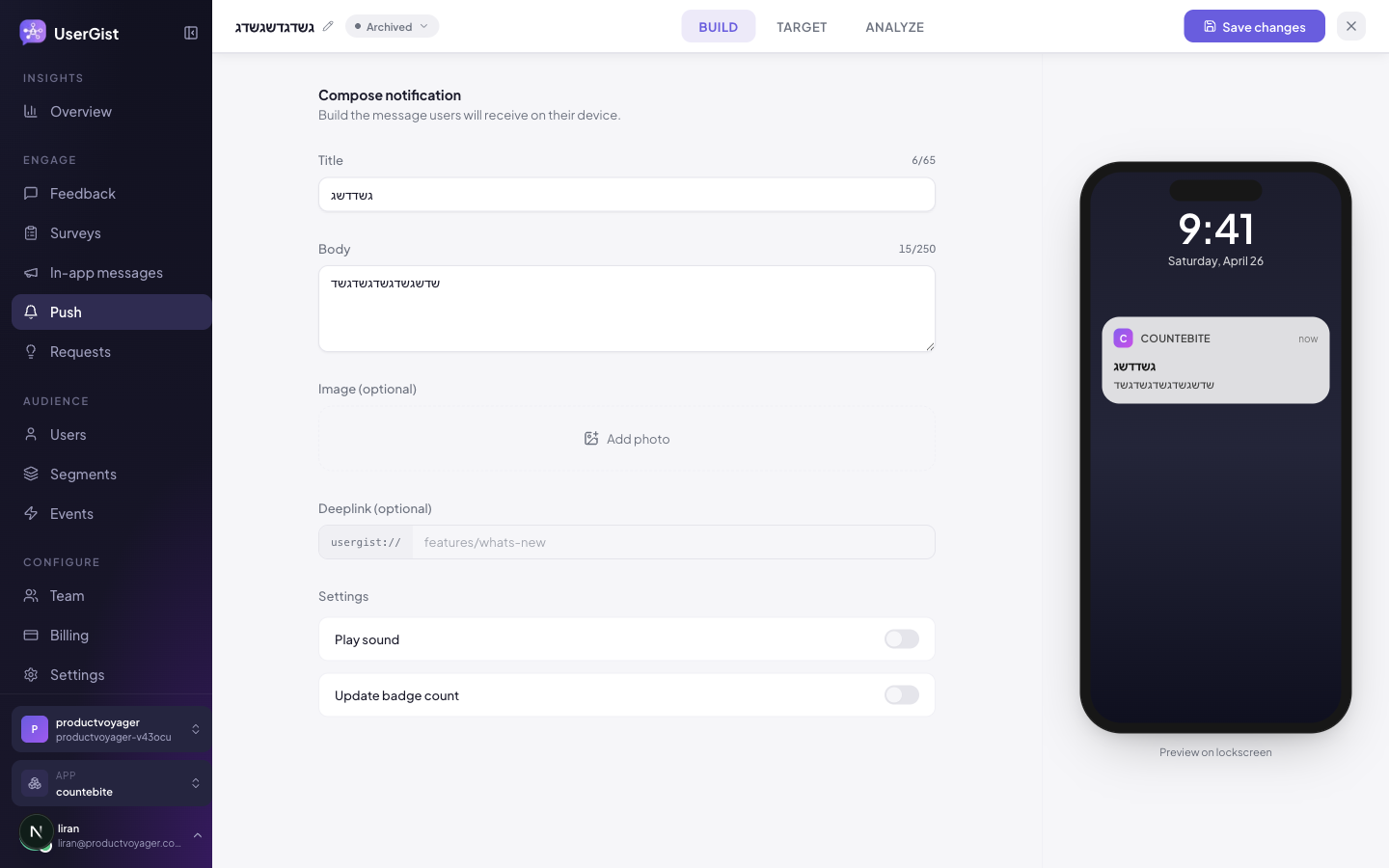
The Build step has a single composer card. Every field you see in the dashboard:
| Field | Notes |
|---|---|
| Title | 1–65 chars (soft cap matching iOS / Android lockscreen truncation). |
| Body | 1–250 chars (soft cap). |
| Image | Optional. Renders as an attachment (iOS NSE) or imageUrl (FCM). |
| Deeplink | Optional. The form prefills the usergist:// prefix; you edit the path. Routes inside your app on tap. |
| Play sound | Toggle. When on, sets sound: "default". |
| Update badge count | Toggle. When on, sets the iOS badge increment to +1. |
The API accepts actionButtons, urgency, interruptionLevel, androidChannelId, iosThreadId, collapseKey, and ttlSeconds — useful for transactional pushes from your server. The dashboard composer doesn't expose them today; reach out if you need them surfaced. Send from the API as documented in API → Push.
Stage 2 — Target
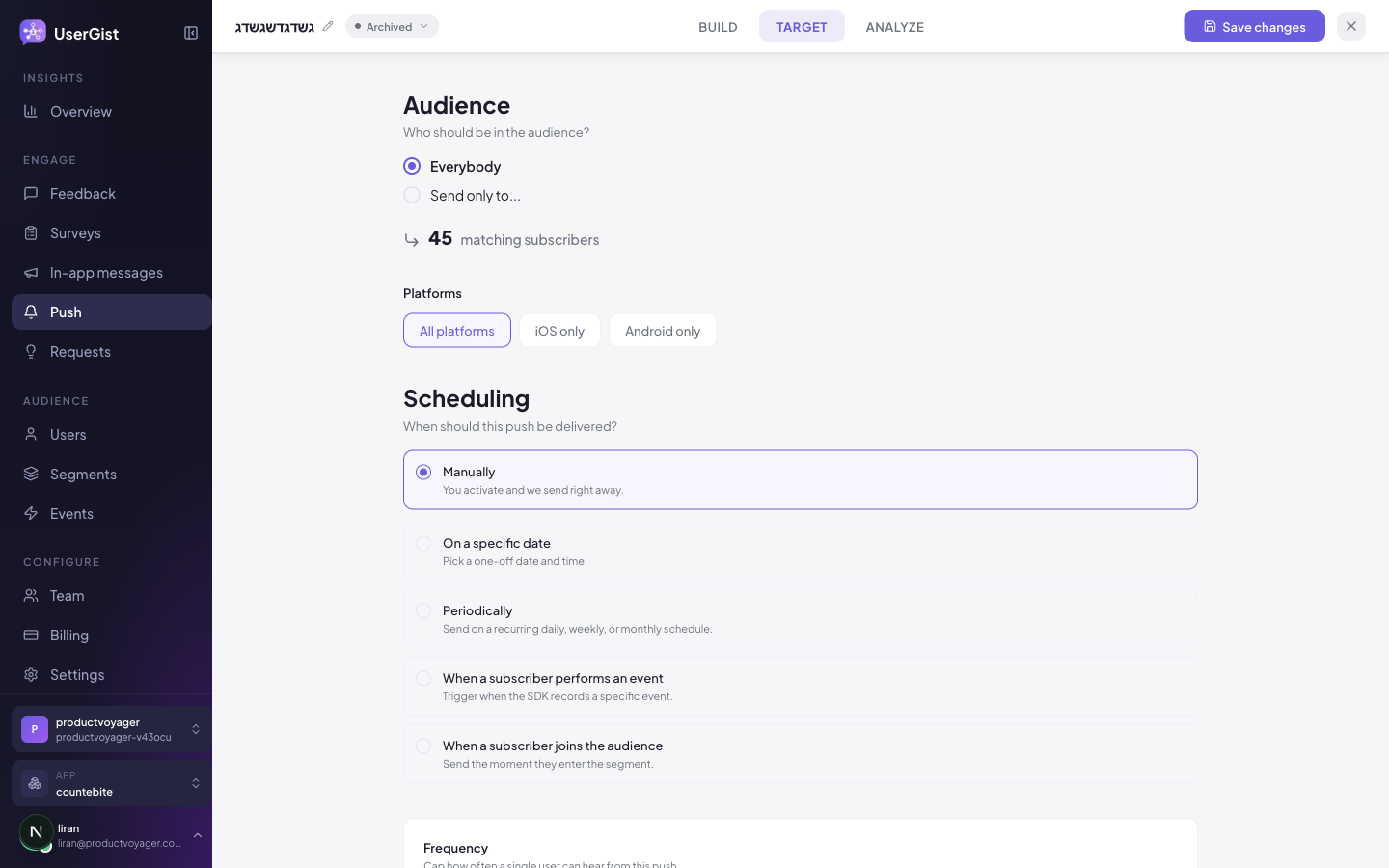
The Target step combines platforms, scheduling, audience, and frequency + quiet hours into one page.
Platforms
A three-option toggle:
| Value | Notes |
|---|---|
| All platforms | Send to every registered token. |
| iOS only | APNs only. |
| Android only | FCM only. |
Scheduling — the 5 delivery modes
These are the exact dashboard labels you'll see. Pick one.
| Mode | Dashboard label | What it does |
|---|---|---|
manual | Manually | "You activate and we send right away." A pure one-shot — click Activate and it goes. |
specific_date | On a specific date | "Pick a one-off date and time." One calendar moment, local to your workspace timezone. |
periodic | Periodically | "Send on a recurring daily, weekly, or monthly schedule." Configure frequency (daily / weekly / monthly), hourLocal:minuteLocal, plus weekday for weekly or dayOfMonth for monthly. |
event | When a subscriber performs an event | "Trigger when the SDK records a specific event." Configure the event name + optional property filters + occurrence (every / after_nth / first_only) + delaySeconds. |
audience_join | When a subscriber joins the audience | "Send the moment they enter the segment." Configure optional delaySeconds. Pairs with a segment that defines the entry condition (e.g. trial day 3 or churn risk). |
There's also a transactional mode exposed via POST /v1/apps/:appId/campaigns for server-driven sends (order confirmations, password resets). It bypasses the editor entirely — see API → Push.
Audience
Same 8 condition kinds as every other channel — see Segments. Use the audience-size badge to sanity-check the reach before shipping.
Frequency caps
Four knobs, all 0–365 days (or 1–100 for the per-user max):
| Field | Range | What it caps |
|---|---|---|
| Max sends per user (lifetime) | 1–100 | Hard ceiling — never send more than N total to a single user. Leave empty for unlimited. |
| Per-campaign cooldown (days) | 0–365 | Time before this specific campaign can fire to the same user again. |
| Per-pillar cooldown (days) | 0–365 | Time before any push can fire to the same user. Prevents two campaigns from double-tapping someone. |
| Global cooldown (days) | 0–365 | Time before any channel (push, in-app, prompt, survey) can fire to the same user. |
Quiet hours
A single block with three controls when enabled:
| Field | Notes |
|---|---|
| Enabled | Master toggle. Off by default. |
| Start (0–23) | Local hour of day when the quiet window begins. |
| End (0–23) | Local hour of day when it ends. Crosses midnight if end < start. |
| Behavior | Hold until quiet hours end (queue the send for delivery once the window closes) or Drop the send (discard during the window). |
Marketing: Drop the send, window 22:00 → 07:00. Transactional: Hold until quiet hours end with the same window so receipts still arrive when the user wakes up.
Stage 4 — Analyze
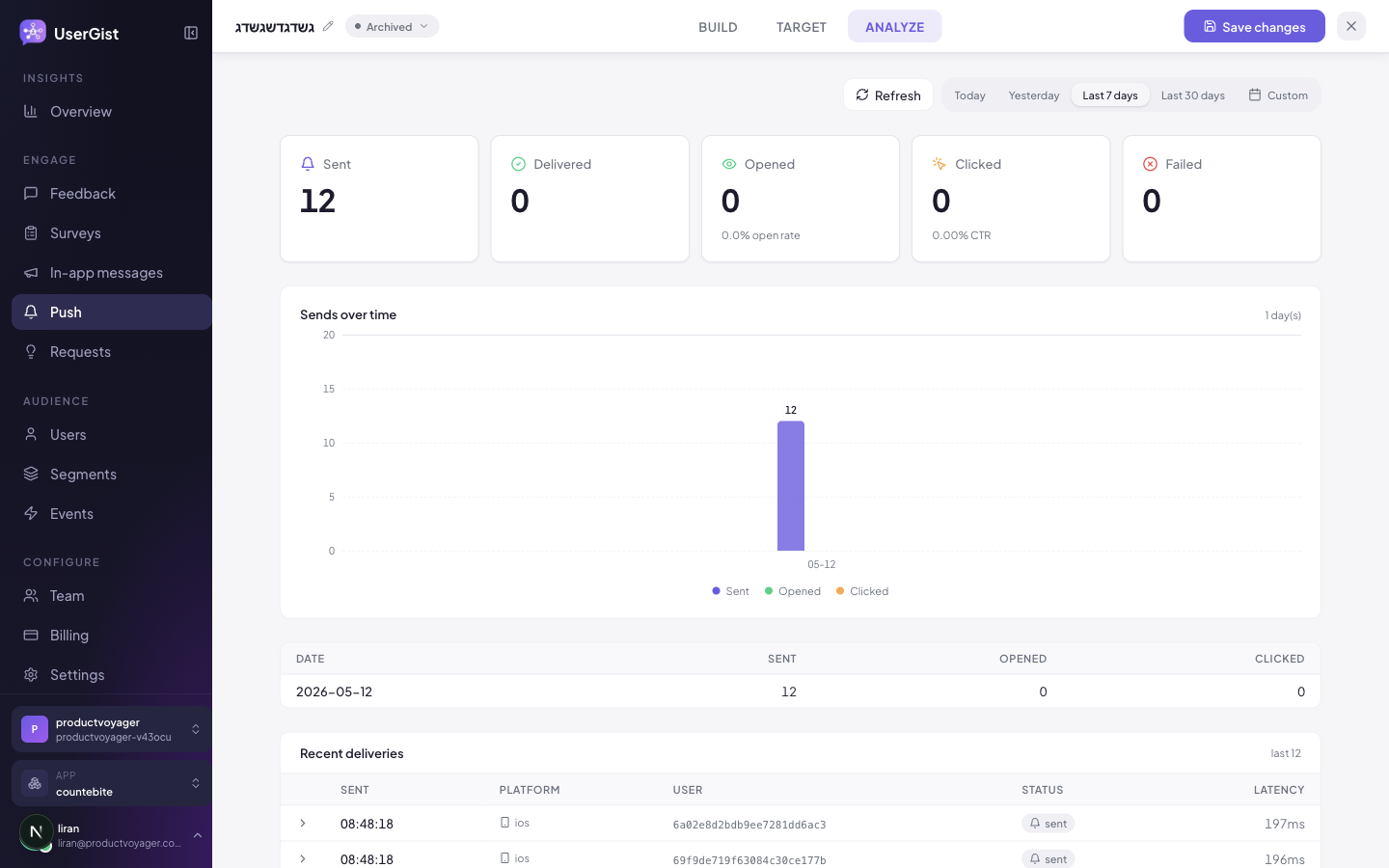
After the campaign is live, the same editor route flips to a read-only Analyze view.
You see:
- Funnel — Sends → Delivered → Opened → Clicked.
- Per-platform breakdown (APNs vs FCM).
- Bounce reasons —
invalid_token,app_uninstalled,payload_too_large,apns_rejected,fcm_rejected. - Quiet-hours dropped count (separate from bounces, only visible when quiet hours are on).
- Time series at 24h / 7d / 30d.
Status lifecycle
| Status | Meaning |
|---|---|
draft · scheduled · active · paused · completed · archived | Same shape as surveys + in-app. |
SDK side
Push setup is per-platform — see:
And Guides → Send your first push for the full credential + first-campaign walkthrough.
API
GET /v1/apps/:appId/campaigns?type=push— listPOST /v1/apps/:appId/campaigns— create (incl. transactional mode + API-only fields)PATCH /v1/apps/:appId/campaigns/:cid— updatePOST /v1/apps/:appId/campaigns/:cid/test-send— send a draft testPOST /v1/apps/:appId/push/transactional— backend send with an idempotency keyGET /v1/apps/:appId/push/credentials— list APNs/FCM credentialsGET /v1/apps/:appId/users/:anonymousId/push— consent and registered devices
The customer-integration OpenAPI document is available at
https://api.usergist.com/openapi.json.
Personalized content and tap actions
Use Insert field for a saved name, the latest matching activity, or the event that triggered this push. Reuse the same activity source for the movie title, show ID and playback position. The Action data editor supports typed JSON for the default notification tap and action buttons; your app handles navigation. Preview as user resolves content and action data without sending a notification. Follow Personalize messages for the full continue-watching example, missing-value behavior and SDK callbacks.
What's next
- Guides → Send your first push
- API → Webhooks — react server-side to delivery events
- Admin → Push credentials
Websites
The Web SDK supports feedback, surveys, in-app messages and feature requests, but does not register browser push subscriptions, request notification permissions or install a service worker. APNs/FCM setup on this page applies to native mobile integrations.