
GDPR & consent
UserGist provides consent controls for supported SDK purposes. Integrate them with your app's actual privacy choices and lawful basis. Technical consent flags do not by themselves establish GDPR/CCPA compliance or valid legal consent.
The consent model
The SDK accepts a Consent object with four independent boolean purposes:
| Purpose | Gates |
|---|---|
analytics | Behavioural events (track, lifecycle events). |
feedback | One-question prompts. |
push | Push token registration and delivery. |
survey | Multi-step surveys. |
If a purpose is false, the corresponding subsystem is gated client-side: events stay un-queued, prompts don't render, push tokens aren't registered.
Recommended flow
- 1
Init the SDK with all purposes off (or your existing stored consent)
UserGist.init({ writeKey: 'rk_live_...', environment: 'production' }) await UserGist.setConsent({ analytics: false, feedback: false, push: false, survey: false, }) - 2
Show your consent UI
Use your existing CMP or build a simple in-app screen with toggles per purpose.
- 3
Persist + apply the user's choice
Save it locally (so you don't show the banner twice) and tell the SDK:
await UserGist.setConsent({ analytics: true, feedback: true, push: false, survey: true, }) - 4
Allow re-opening
Provide a Privacy preferences button somewhere (settings screen, footer) so users can change their mind. Wire it to the same
setConsentcall.
What happens when consent is false
track()calls are accepted by the SDK but not queued or sent.- Targeted prompts and surveys won't render even if a trigger fires.
- Push registration and delivery are gated. When consent is withdrawn, also call
the SDK's
disablePush()method so the current device token is invalidated at UserGist and notification permission handling stays explicit in your app. - Lifecycle events (
app_opened,session_started) respect theanalyticsgate.
PII allow-list
Even with consent, userGist blocks high-sensitivity properties by default:
- Contact and identity keys such as
email,phone,mobile,ssn,tax_id,national_id,passport, names, postal addresses, and birth dates.
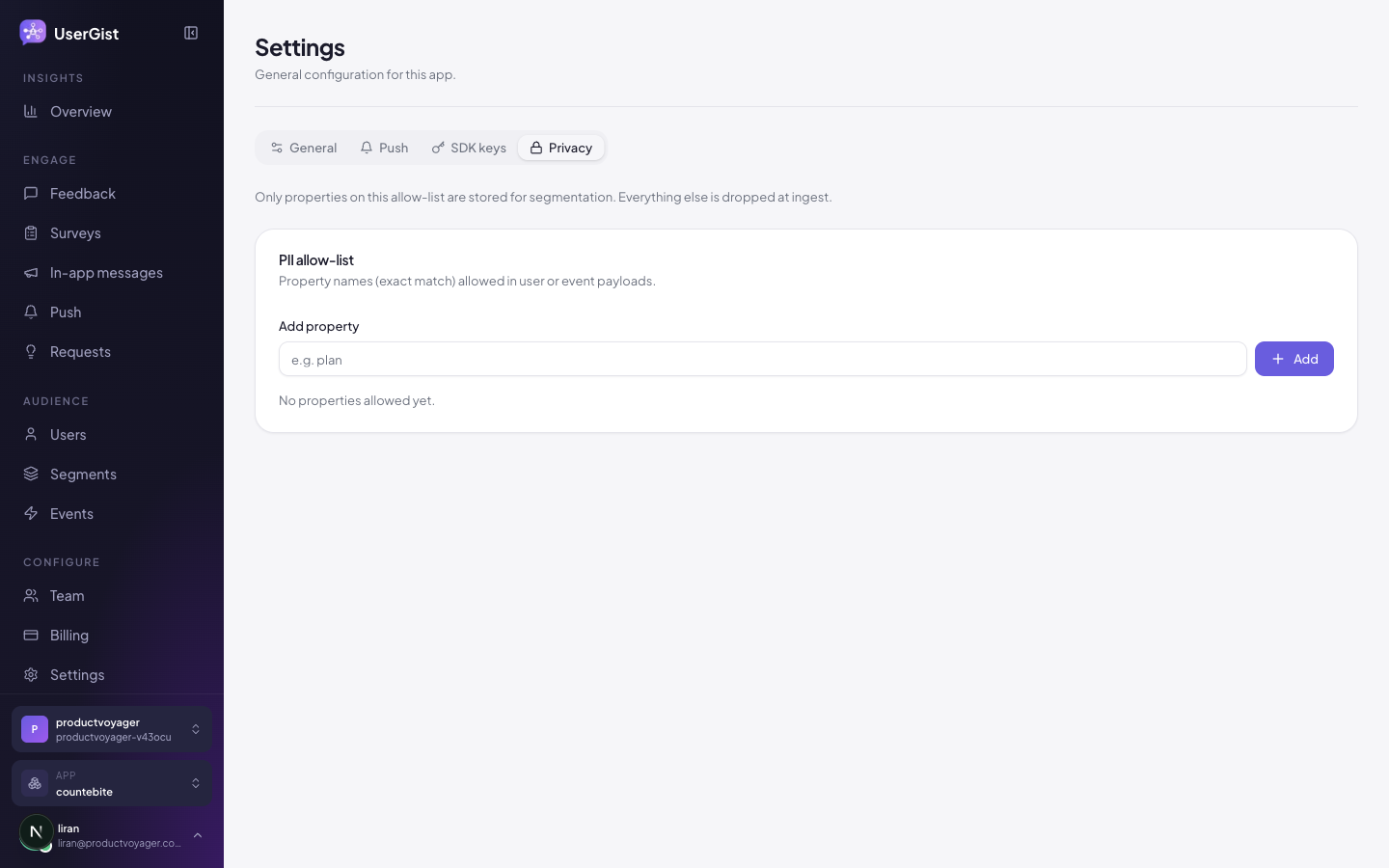
If you legitimately need to send one, add its exact property key to the per-app allow-list at App settings → Privacy. Matching properties that are not allow-listed are removed before storage; the rest of the event or identify call is accepted.
Right to be forgotten (deletion)
Two paths:
- Dashboard — Users → search user → Delete user. Queues a deletion job.
- API —
POST /v1/apps/:appId/gdpr/deletewith a signed-in operator's WorkOS access token andadminrole. Send either{ "externalId": "..." }or{ "anonymousId": "..." }.
Deletion:
- Resolves all anonymous aliases linked to the subject.
- Removes the subject graph, consent, response, engagement, and device-token records.
- Redacts authored request content while preserving unrelated users' engagement.
- Deletes the matching analytics data before the job is marked complete.
Right of access (export)
Call POST /v1/apps/:appId/gdpr/export with an externalId or anonymousId.
The response contains an exportId; poll
GET /v1/apps/:appId/gdpr/exports/:exportId until a short-lived download URL
is ready. Both endpoints require a signed-in dashboard operator, and creating
the export requires the admin role.
Data residency
Locations depend on deployed services and vendor configuration; there is no universal EU-only or Frankfurt-only guarantee. Confirm your requirements and transfer safeguards using the provider inventory.
DPA & subprocessors
A DPA review draft and provider inventory are available. Contact [email protected] for current executed arrangements. The checked configuration includes Resend and Cloudflare R2; using AWS-compatible libraries does not establish direct AWS storage usage. These review pages do not replace your own privacy notice or an executed agreement.
What's next
- Admin → Privacy & PII
- API → Users
- Features → Push — channel subscriptions for granular opt-outs
Web participation and consent
Web initialization is inactive: it does not create a visitor identity, open storage, send requests or mount UI. Apply the intended consent and explicitly identify a participant using a server-minted token. Anonymous participation requires both allowAnonymous and startAnonymous(); see the Web SDK guide.
On web, feedback consent governs feedback, in-app messages and feature requests; survey consent governs surveys. Withdrawing one of these closes its displayed screen and discards its queued work, while other consent purposes remain independent. Browser push is not implemented.
Await reset() on host logout before identifying another account. It ends the browser client, clears its pending work and resets other active tabs for that user. It does not revoke consent or invalidate native push registrations across that user's devices.