
Feature requests
Collect customer ideas through your Customer Portal and the SDK request board. Your team triages the shared app-scoped records, replies, and chooses which requests become public.
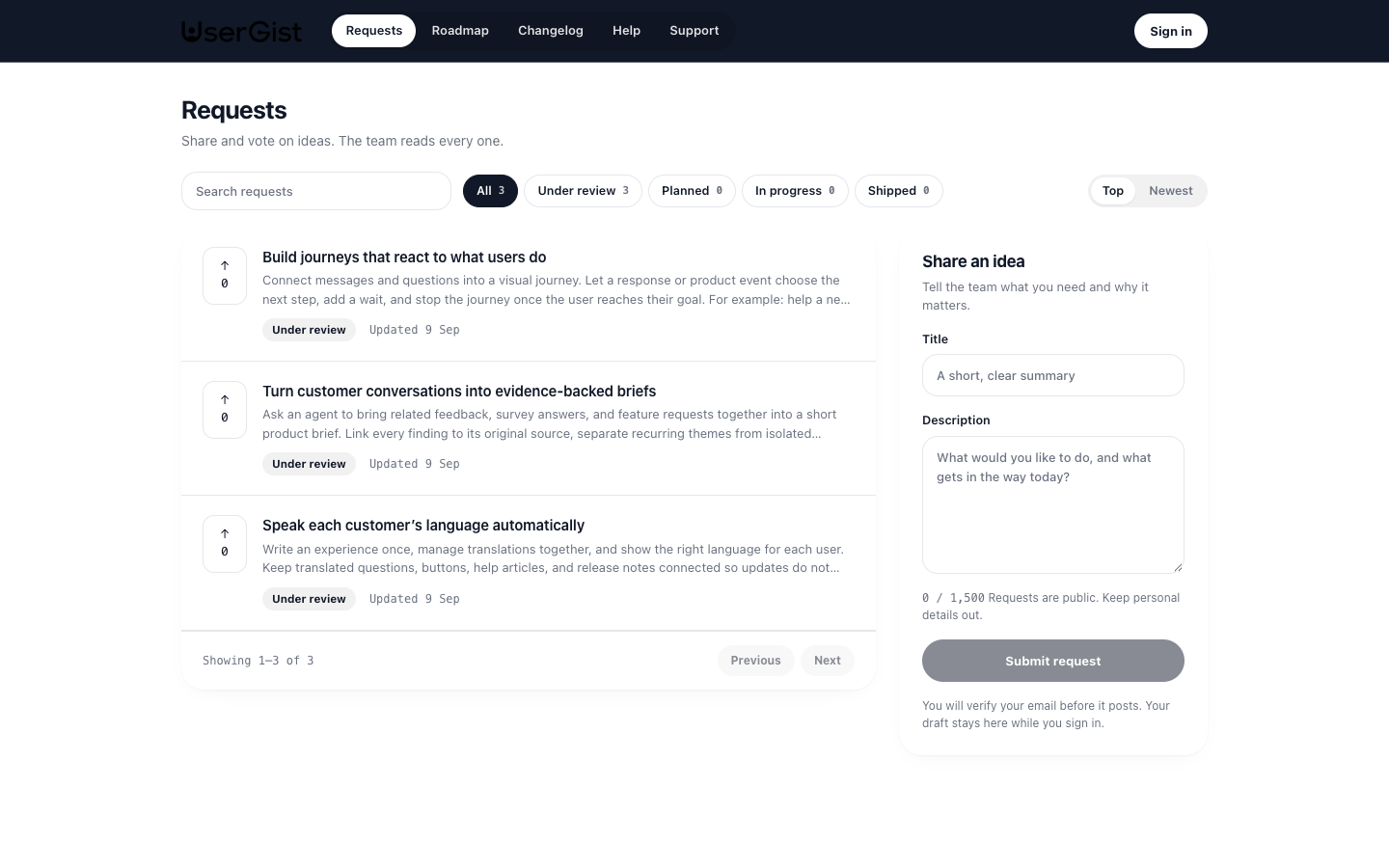
Requests belong under Customer Portal, alongside Roadmap, Help center, Changelog, and optional Support. They have their own status and visibility rather than the Engage campaign composer. Portal settings controls your company address, included apps, and publication.
Portal and SDK participation
Customers can read published requests without signing in. Portal submission and voting require email verification and feedback consent. SDK submission, voting, following, and comments use the app's write key, consent, and an authenticated anonymous or identified subject. Portal identities remain separate from SDK identities.
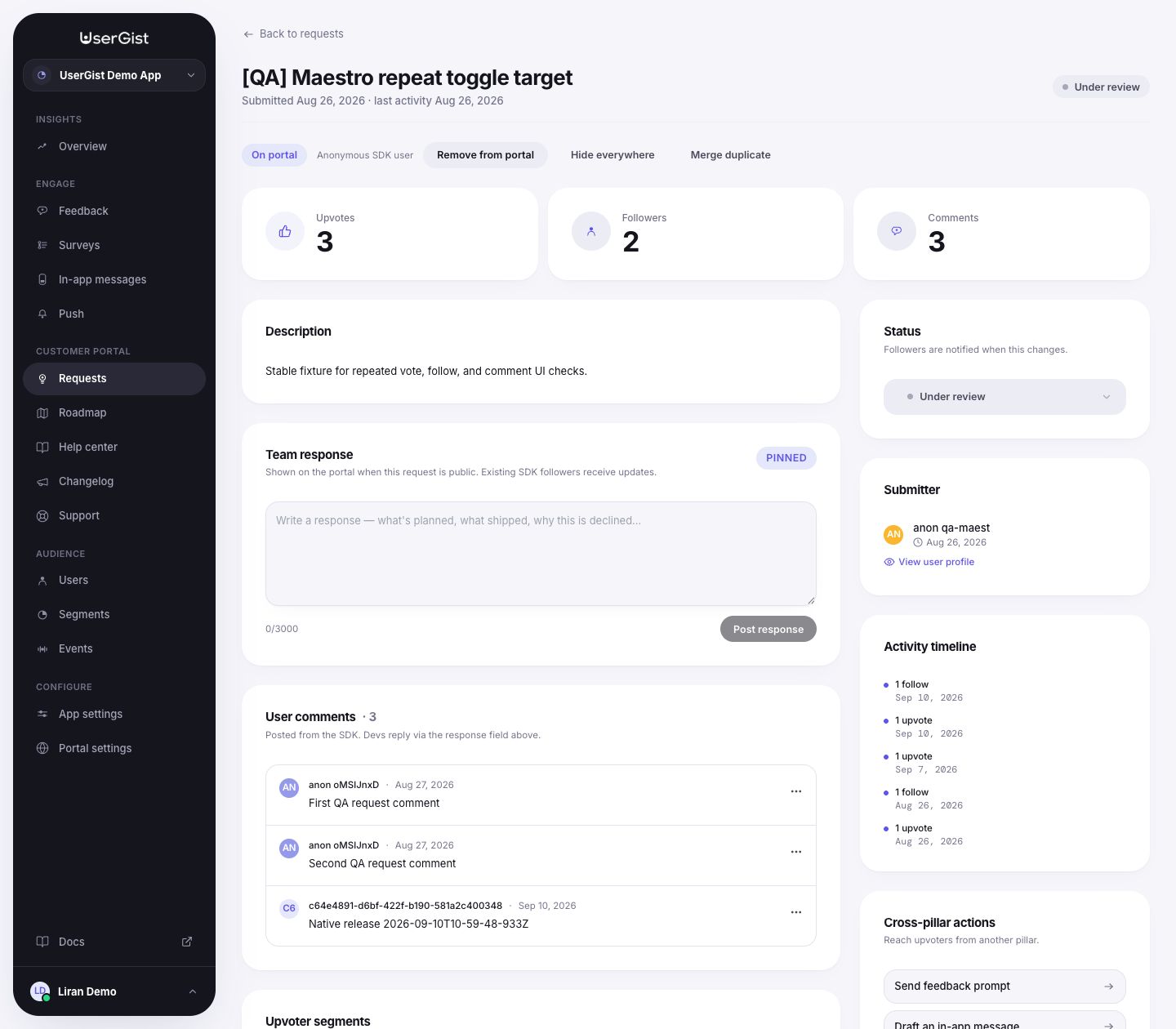
The dashboard shows each request's source (Portal or SDK). Detail pages distinguish verified portal visitors, anonymous SDK users, and identified SDK users. Public pages do not expose private participant identities or SDK comments.
Request settings reference
The request settings API configures SDK board access, appearance, and follower notifications. These fields are distinct from company portal settings. The dashboard's current appearance controls are described in Setup & branding; the API schema also retains older public-roadmap fields.
Entry
| Field | Notes |
|---|---|
enabled | Master toggle. When off, the SDK board doesn't render and submitRequest rejects with disabled. |
entryLabel | The string shown on your in-app entry point (1–60 chars). Default: Feature requests. |
SDK permissions — who can do what
Two segments gate access:
| Field | Notes |
|---|---|
viewSegmentId | Segment of users who can view the board. Leave empty to allow everyone. |
submitSegmentId | Segment of users who can submit new requests. Typically narrower than view — e.g. only paying users can submit. |
These segment rules govern the SDK board. Hosted portal participation uses its own email-verified visitor session and portal publication checks.
Earlier public-roadmap API settings
| Field | Notes |
|---|---|
publicRoadmapEnabled | Enables the earlier /v1/public/roadmap/:slug read-only request API. |
publicSlug | Slug used by that earlier API; separate from the company portal address and app path. |
For the current hosted portal, use https://<company>.usergist.com/<app>/requests and /roadmap, with the portal's published state, included apps, and request visibility. Do not use the earlier fields to configure the new portal.
Branding
| Field | Notes |
|---|---|
logoUrl | App logo used on the portal and SDK request board. |
accentColor | Hex #rrggbb. Active states and upvote highlights. |
portalColors | Custom primary, background, text, secondary-text, and border colors. |
introCopy | Up to 500 chars. Intro below the Requests heading and on the SDK board. |
themeMode chooses the app default or custom theme. coverImageUrl remains in the request settings schema; the current hosted portal does not render a cover-image hero.
Notification rules
Triage actions can notify followers automatically.
| Rule | Triggers when |
|---|---|
transitions | A request's status changes — keys such as under_review->planned enable or disable a transition. |
responseFirst | First admin response is posted. |
responseEdit | Admin edits an existing response. |
templateOverrides | statusChange and response copy overrides for outgoing instructions. |
The current service queues in-app SDK instructions for eligible followers with feedback consent. Automatic native push delivery for request updates is not implemented. Portal voting does not create an SDK follow, and the portal does not expose visitor follow or comment controls.
Triage board
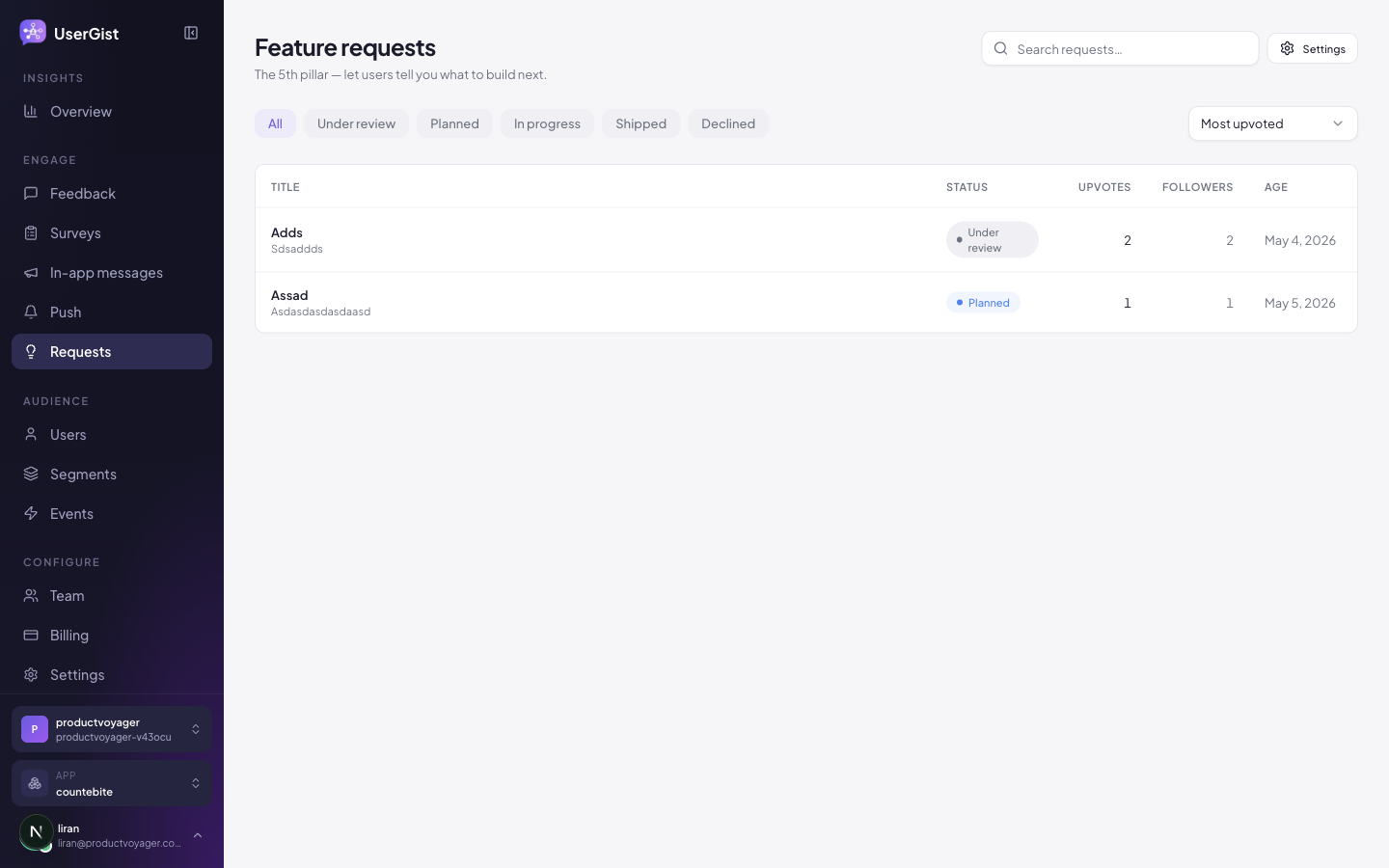
Open Customer Portal → Requests for the searchable list with status filters, votes, source, and portal visibility. Open a row to review its detail, change status, write a team response, or moderate it. The separate Roadmap groups planned, in-progress, and shipped work into columns.
Sort
| Value | Notes |
|---|---|
top | Highest vote count first. |
newest | Most recently submitted. |
recently_updated | Most recent triage activity (status change, response, comment). |
API and SDK filters
- Status — multi-select across
under_review,planned,in_progress,shipped,declined. - Personal filter —
submitted(by me) ·upvoted·following. - Hidden — show requests admin-hidden for moderation.
- Search — debounced (300 ms) across title + body.
Statuses
| Status | Default order | Meaning |
|---|---|---|
under_review | 1 | Open for discussion; no commitment. |
planned | 2 | On the roadmap. We will build this. |
in_progress | 3 | Active development. |
shipped | 4 | Live. Configured SDK follower notification rules apply. |
declined | 5 | Won't build. Add a team response to explain the decision. |
Bulk operations
The API supports:
- Change status (up to 200 at once).
- Merge — pick a canonical + duplicates. Votes and followers transfer; comments preserve.
Developer responses and hide / unhide moderation are available on an individual request.
The dashboard list supports selecting requests to publish on the portal or remove from it.
In-app surface
Two ways your app talks to requests:
// Hosted UI (recommended) — UserGist renders the full board
UserGist.openRequestsBoard()
UserGist.openRequestDetail('req_abc123')

// Or build your own UI on the data APIs
const { items } = await UserGist.getRequests({ statuses: ['planned'], q: 'dark' })
await UserGist.voteOnRequest('req_abc123', true)
await UserGist.followRequest('req_abc123', true)
UserGist.submitRequest('Dark mode', 'A system-aware theme would help.', (error, request) => {
  if (error) console.error(error)
})

const comments = await UserGist.getComments('req_abc123')
await UserGist.postComment('req_abc123', 'Yes please.')
Optimistic semantics (identical on every SDK):
- Voting auto-follows the request.
- Un-voting does not unfollow.
- Vote / follow tap updates the UI immediately and reconciles with the server.
Publish requests on the portal
Select requests and choose Publish on portal, or open one request and use the same action. Review the public title, description, status, vote count, and team response before confirming. Use Remove from portal to make a request private there.
Publication requires a published company portal and an included app. SDK visibility remains independent. Globally hidden requests stay hidden until unhidden. A portal-origin submission is published on the portal when created; your team can remove it or hide it afterward. SDK submissions need an explicit portal publication decision.
Published requests in Planned, In progress, or Shipped also appear in the portal roadmap. Separate team roadmap items can link requests without merging them; see Roadmap.
See Share your portal & roadmap for links and SDK presentation. The current portal does not implement iframe embedding.
Closing the loop
When an operator changes status or posts a developer response, UserGist's request notification service applies the configured transition/response rules and queues in-app instructions for eligible SDK followers. Queuing is not proof that a device displayed an update. Automatic request-update push is not implemented; a native push announcement is a separate Engage campaign.
API
GET /v1/apps/:appId/requests— list (admin)POST /v1/sdk/requests— SDK submissionPATCH /v1/apps/:appId/requests/:requestId/status— change statusPATCH /v1/apps/:appId/requests/:requestId/moderation— hide or unhidePOST /v1/apps/:appId/requests/merge— merge duplicatesGET /v1/public/roadmap/:slug— public roadmap dataPATCH /v1/apps/:appId/requests/portal-visibility— current portal publicationGET /v1/portal/:portalSlug/apps/:appSlug/requests— current public request list
Comment, vote, and follow endpoints all under the same family. Canonical schemas: apps/api/src/schemas/requests.ts.
For hosted portal sessions, submission, and voting, see Customer Portal API.
What's next
- Customer Portal overview
- Roadmap
- Guides → Share your portal & roadmap
- SDKs → React Native
- Engage → Push — create a separate native announcement
Feature requests on websites
Use the Web SDK to open the request board or a request detail, submit ideas, vote, follow and manage comments. Participation requires explicit activation and feedback consent. The launcher is optional and off by default.
Mutations can return { queued: true, pendingId } while waiting for connectivity or earlier pending work. Treat that as saved locally instead of submitting again. The SDK sends retries and newer actions in order. Loading the board and opening request details require a connection. Browser notification push is not included.