
Segments
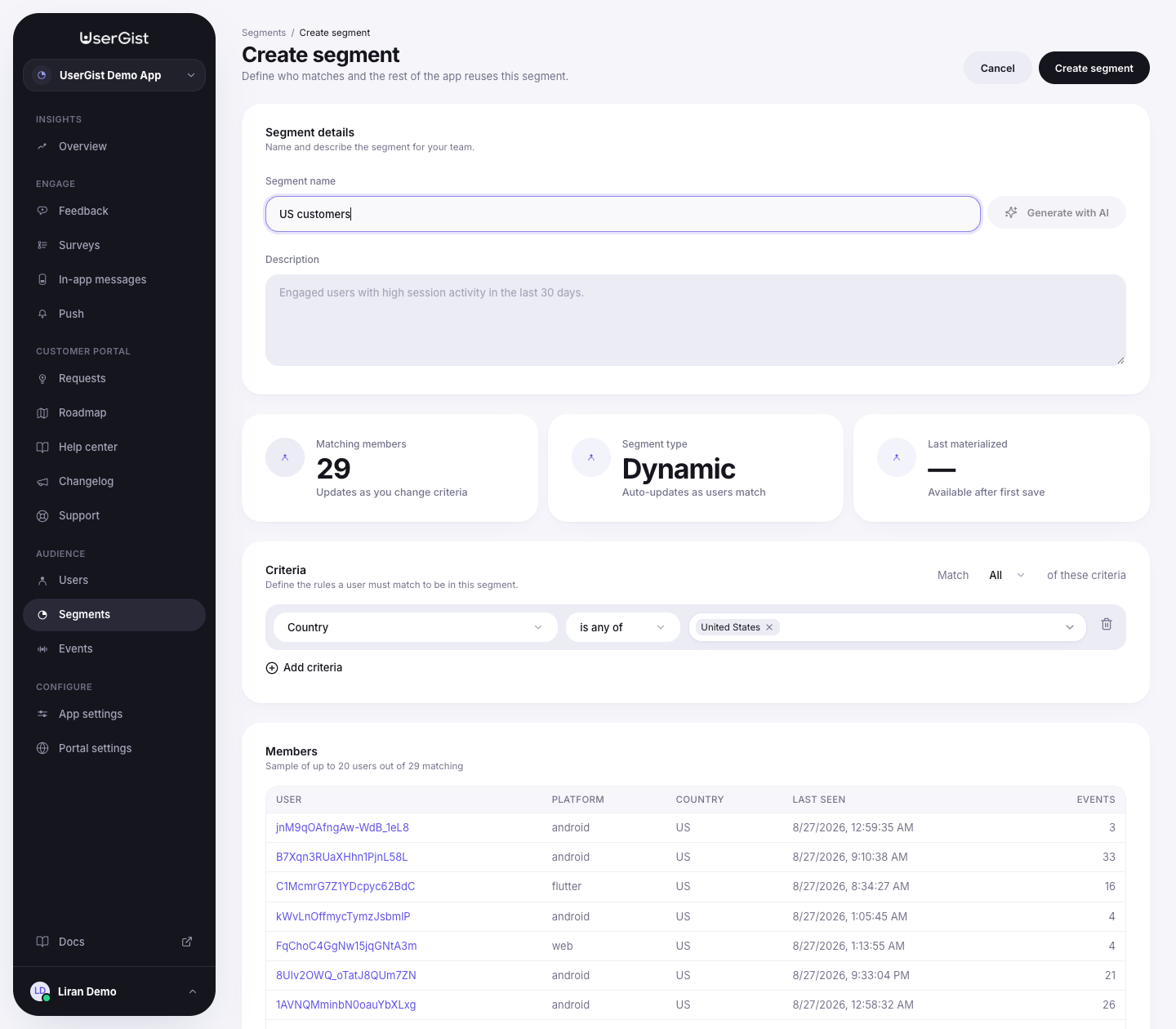
A segment is a reusable audience — a saved query over user properties and behaviour. Every targeted channel (feedback, surveys, in-app, push, requests) uses this same builder, the same row UI, and the same DSL.
The audience you build here is stored once and evaluated server-side. Eligible feedback, survey, and in-app work is written to a durable per-subject instruction inbox; every production SDK polls and acknowledges that inbox. The shared pure evaluator remains available for previews and contract tests, not as a second source of truth.
How conditions compose
A segment is a flat list of rows under one Match selector:
| Selector | UI text | Meaning |
|---|---|---|
combinator: 'all' | All of these criteria | AND — every row must match. |
combinator: 'any' | Any of these criteria | OR — any row matches. |
Click Add criteria to add rows. Each row is Field · Operator · Value. The dashboard supports a flat list today (no nested groups in the UI).
The pillar (feedback / survey / in-app) builders use the same row but add a top-level Everybody vs Send only to radio — segments skip that since "everyone" is just the absence of any criteria.
The 8 condition kinds
Field labels and hints match the dashboard verbatim.
1. Segment — "Pick from saved segments"
Reuse a saved segment as a row inside another segment.
| Operator value | UI label |
|---|---|
is | is matching |
is_not | is not matching |
Value: a list of segment IDs (multi-select from your saved segments).
{ "kind": "segment", "op": "is", "segmentIds": ["seg_paying_users"] }2. Country — "Match by ISO country code"
ISO 3166-1 alpha-2 codes.
| Operator value | UI label |
|---|---|
is_any_of | is any of |
is_none_of | is none of |
Value: list of country codes.
{ "kind": "country", "op": "is_any_of", "values": ["DE","FR","IT","ES","NL","BE","SE","DK","FI"] }3. Last active — "When the user was last seen"
Recency on activity.
| Operator value | UI label | Value |
|---|---|---|
within_days | within last | days |
before_days | before last | days |
never | never active | — |
{ "kind": "last_active", "op": "before_days", "days": 14 }4. Install date — "When the user first appeared"
Cohort by first-seen timestamp.
| Operator value | UI label | Value |
|---|---|---|
within_days | within last | days |
before_days | before last | days |
after_date | after | ISO date |
before_date | before | ISO date |
between | between | from + to |
{ "kind": "install_date", "op": "within_days", "days": 7 }5. Platform — "iOS / Android / Web"
| Operator value | UI label |
|---|---|
is | is |
is_not | is not |
Value: list of one or more platforms (ios / android / web).
{ "kind": "platform", "op": "is", "values": ["ios"] }6. User property — "Custom user attribute"
The most flexible row. Match against anything you've sent via identify. The UI exposes 8 operators:
| Operator value | UI label |
|---|---|
eq | equals |
neq | not equals |
in | is one of |
nin | is not one of |
contains | contains |
starts_with | starts with |
exists | exists |
not_exists | does not exist |
{ "kind": "user_property", "key": "plan", "op": "in", "value": ["pro", "enterprise"] }The API also accepts gt, gte, lt, lte on user_property for numeric or date fields. They aren't yet exposed in the dropdown — use the REST API directly if you need them on a segment.
7. Performed event — "Has / has not done X"
Behavioural matcher.
| Operator value | UI label |
|---|---|
did | has performed |
did_not | has not performed |
Plus fields:
eventName— autocomplete from registered events.windowDays—1–365. Defaults to 30.minCount(optional, fordid) — only count if the user did it at least N times.
{
  "kind": "event_performed",
  "op": "did",
  "eventName": "session_started",
  "windowDays": 7,
  "minCount": 5
}
{
"kind": "event_performed",
"op": "did_not",
"eventName": "subscription_canceled",
"windowDays": 365
}8. App version — "What version of your app the user is on"
Semver-aware matching against the SDK's reported appVersion.
| Operator value | UI label |
|---|---|
eq | equals |
neq | not equals |
gte | at least |
lte | at most |
gt | greater than |
lt | less than |
{ "kind": "app_version", "op": "gte", "version": "2.4.0" }Reserved properties (auto-attached)
Every event ingest carries an SDK-attached context. These keys are queryable from user_property rows without you having to set them.
| Key | Type | Source |
|---|---|---|
anonymousId | string | Generated locally by the SDK. |
externalId | string | Set on identify. |
sdkVersion | string | The SDK build. |
platform | ios · android · react-native · flutter · web | SDK runtime. |
appVersion | string | Your app's CFBundleShortVersionString / versionName. |
locale | string | e.g. en-DE. |
timezone | string | IANA — Europe/Berlin. |
osName / osVersion | string | iOS / Android version. |
deviceModel | string | Marketing model name. |
country | string | Derived at ingest from locale + IP enrichment. |
Preview & audience size
As you edit, an audience badge updates with the current size + a small user sample. The preview hits POST /v1/apps/:appId/audience/preview and computes from ClickHouse in a single query.
Storage model
The DSL on disk, verbatim from @usergist/sdk-core:
interface AudienceSpec {
version: 1
mode: 'everyone' | 'match'
combinator: 'all' | 'any'
conditions: ReadonlyArray<AudienceCondition>
}
type AudienceCondition =
| SegmentCondition
| CountryCondition
| LastActiveCondition
| InstallDateCondition
| PlatformCondition
| UserPropertyCondition
| EventPerformedCondition
| AppVersionConditionevaluateSegment(dsl, user, now) is exported from @usergist/sdk-core for server logic, previews, and parity tests. Production delivery eligibility remains server-authoritative.
Worked examples
Power users
{
"version": 1,
"mode": "match",
"combinator": "all",
"conditions": [
{ "kind": "user_property", "key": "plan", "op": "in", "value": ["pro", "enterprise"] },
{ "kind": "event_performed", "op": "did", "eventName": "session_started", "windowDays": 7, "minCount": 5 }
]
}Trial day 3
{
"version": 1,
"mode": "match",
"combinator": "all",
"conditions": [
{ "kind": "install_date", "op": "within_days", "days": 3 },
{ "kind": "install_date", "op": "before_days", "days": 2 }
]
}Churn risk
{
"version": 1,
"mode": "match",
"combinator": "all",
"conditions": [
{ "kind": "user_property", "key": "plan", "op": "in", "value": ["pro", "enterprise"] },
{ "kind": "last_active", "op": "before_days", "days": 14 },
{
  "kind": "event_performed",
  "op": "did_not",
  "eventName": "subscription_canceled",
  "windowDays": 365
}
]
}More: Guides → Targeting recipes.
API
GET /v1/apps/:appId/segments— listPOST /v1/apps/:appId/segments— createPATCH /v1/apps/:appId/segments/:segmentId— updatePOST /v1/apps/:appId/audience/preview— size + sample
Canonical schemas: apps/api/src/schemas/segments.ts. Evaluator: packages/sdk-core/src/evaluate/segment.ts.